
Your phone,
without the pull.
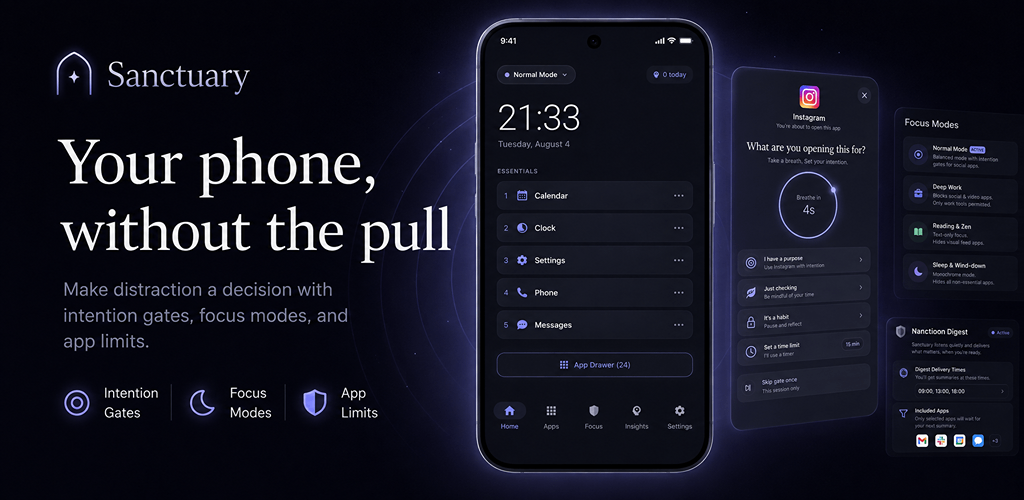
Sanctuary is a minimalist launcher for Android that makes distraction a decision. Intention Gates, daily app limits, and focus modes — all processed on your device.
Get Sanctuary for AndroidFree to install. No account. No ads. Pro from $3.99/mo.
Your phone was designed to be opened without thinking.
One message becomes twenty minutes of scrolling.
Sanctuary doesn't ask you to throw your smartphone away. It introduces just enough friction to turn an automatic tap into a conscious decision.
Hover to reveal the boring home screenTap to reveal the boring home screen
Pause before you scroll.
When you open a selected distracting app, Sanctuary asks one simple question:
"What are you opening this for?"
Experience the Intention Gate here. Tap "Open App" and feel what a four-second pause does to an impulse.
An Intention Gate is a short, deliberate pause placed between you and a distracting app. Nothing is blocked — you always continue if you mean to. The gate only makes the choice conscious.
You're about to open this app
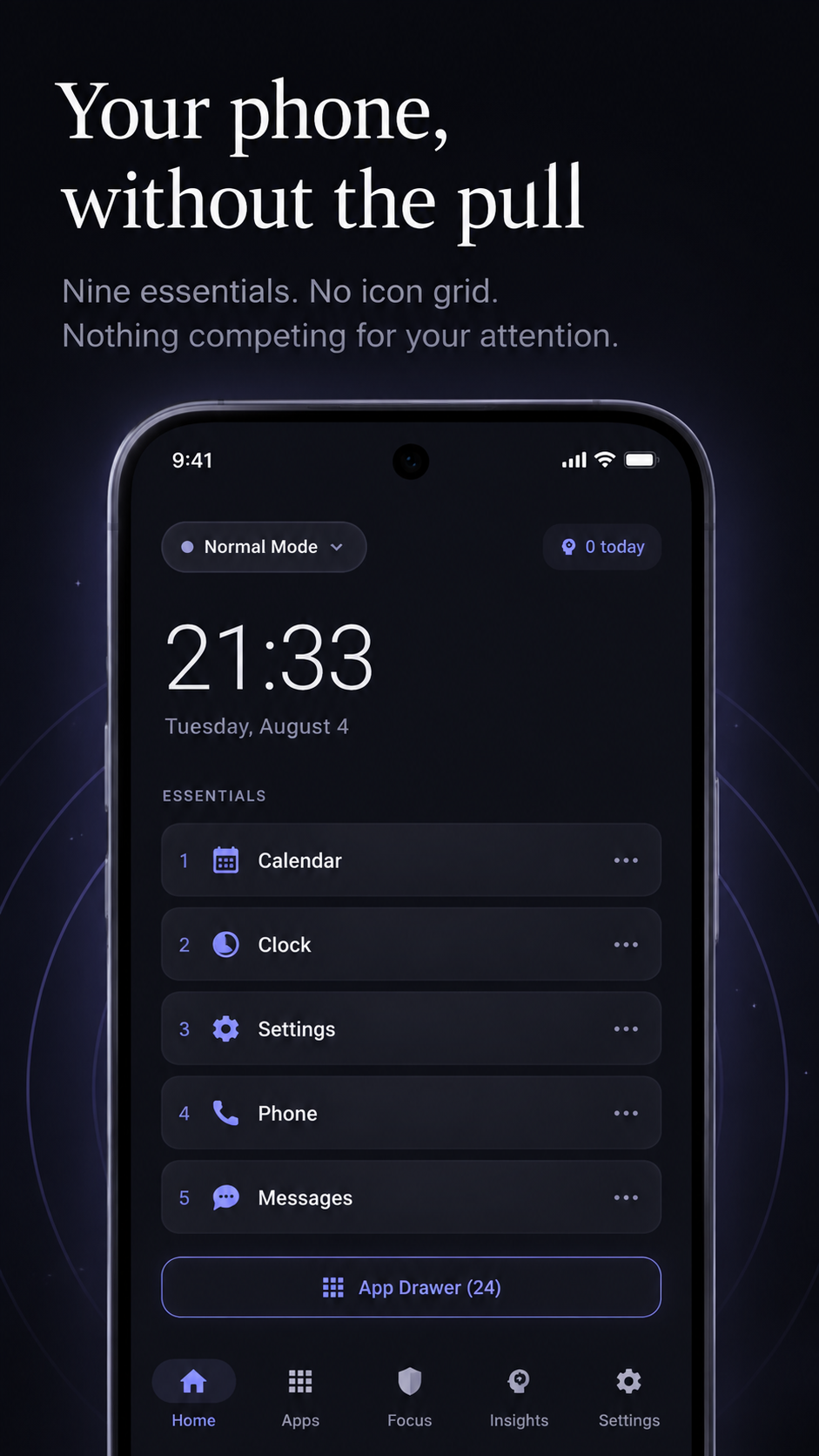
Your phone, without the pull.
Replace a crowded icon grid with a text-first home screen built around time, date, active focus mode, and up to nine essential apps. No social feed, no red badges.
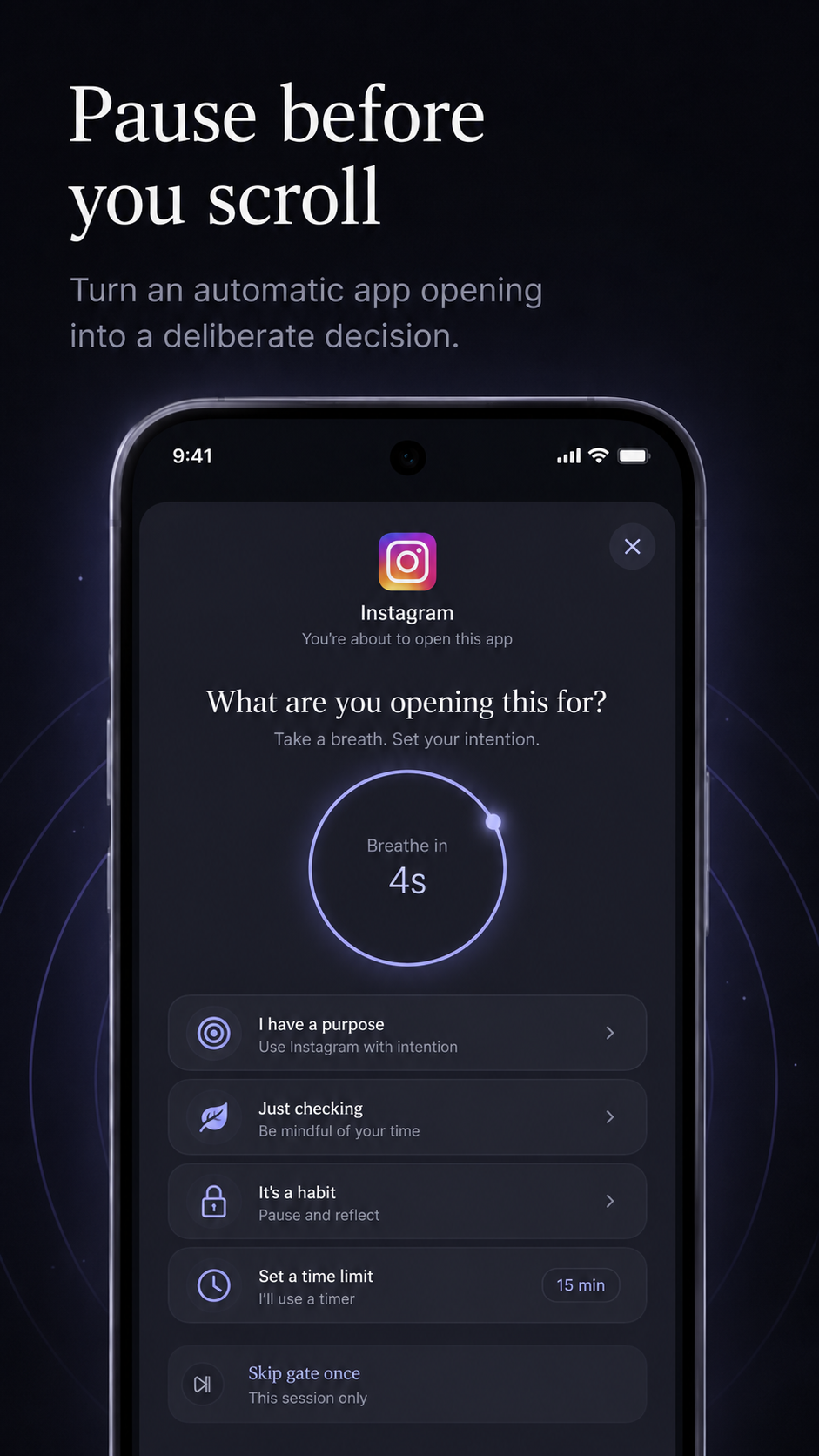
Pause before you scroll.
Configurable breathing cooldown before a selected app opens. Friction by Design.
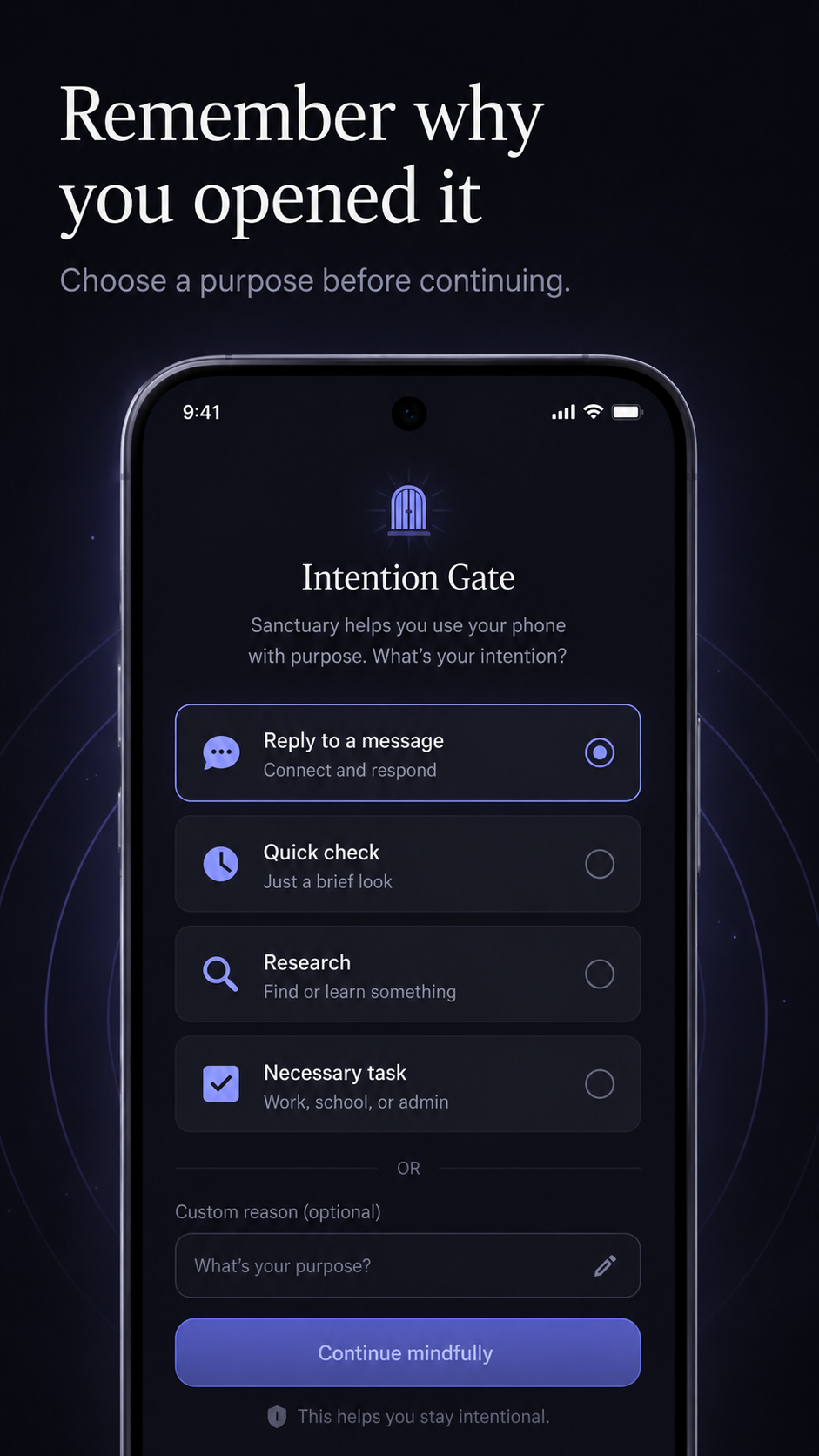
Remember why you opened it.
State your intention. Sanctuary records purposeful opens, cancellations, and overrides locally, then grants a temporary session.
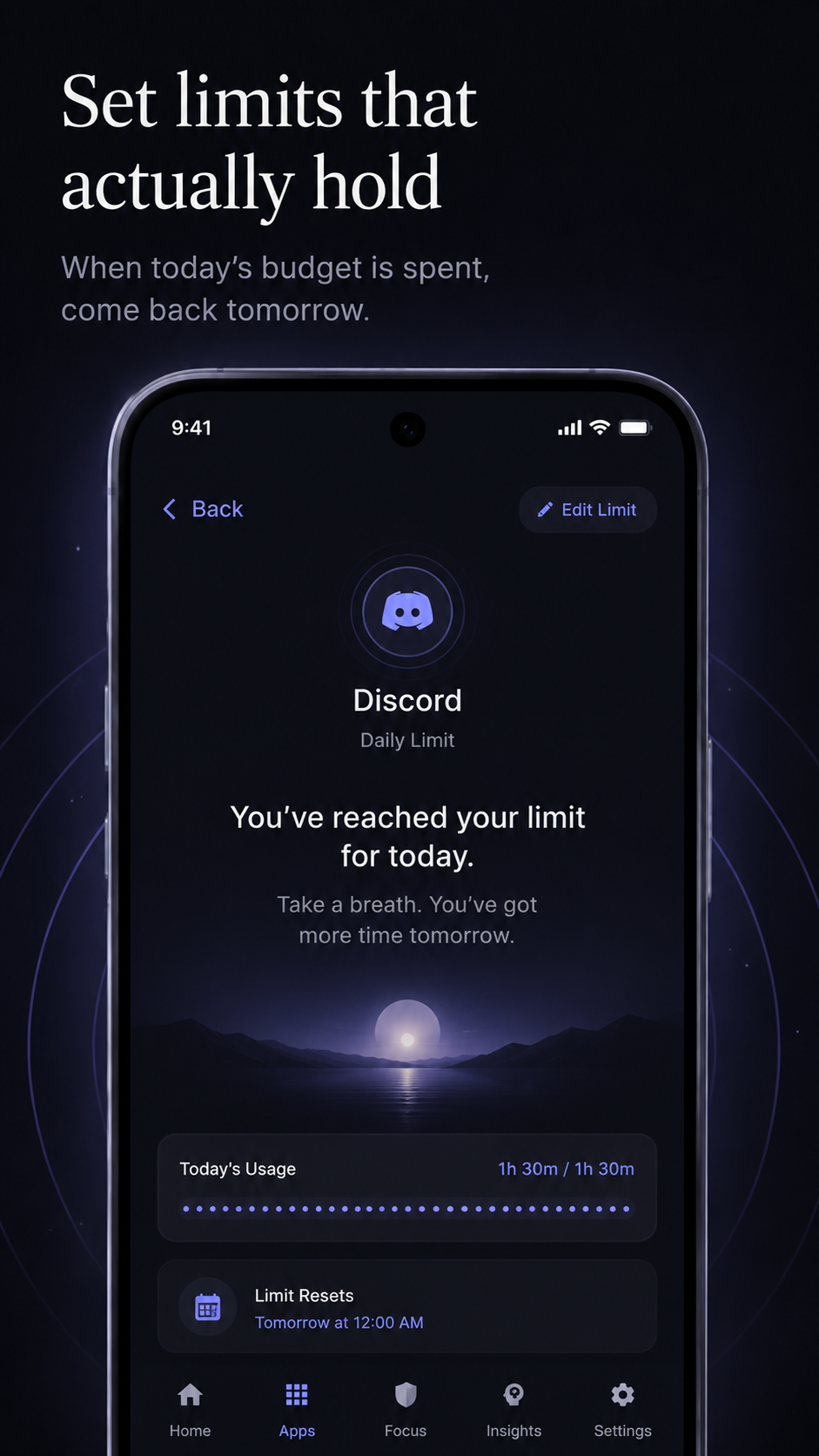
Set limits that actually hold.
Set a daily usage budget for distracting apps. When it's spent, a calm daily-limit screen asks you to come back tomorrow.
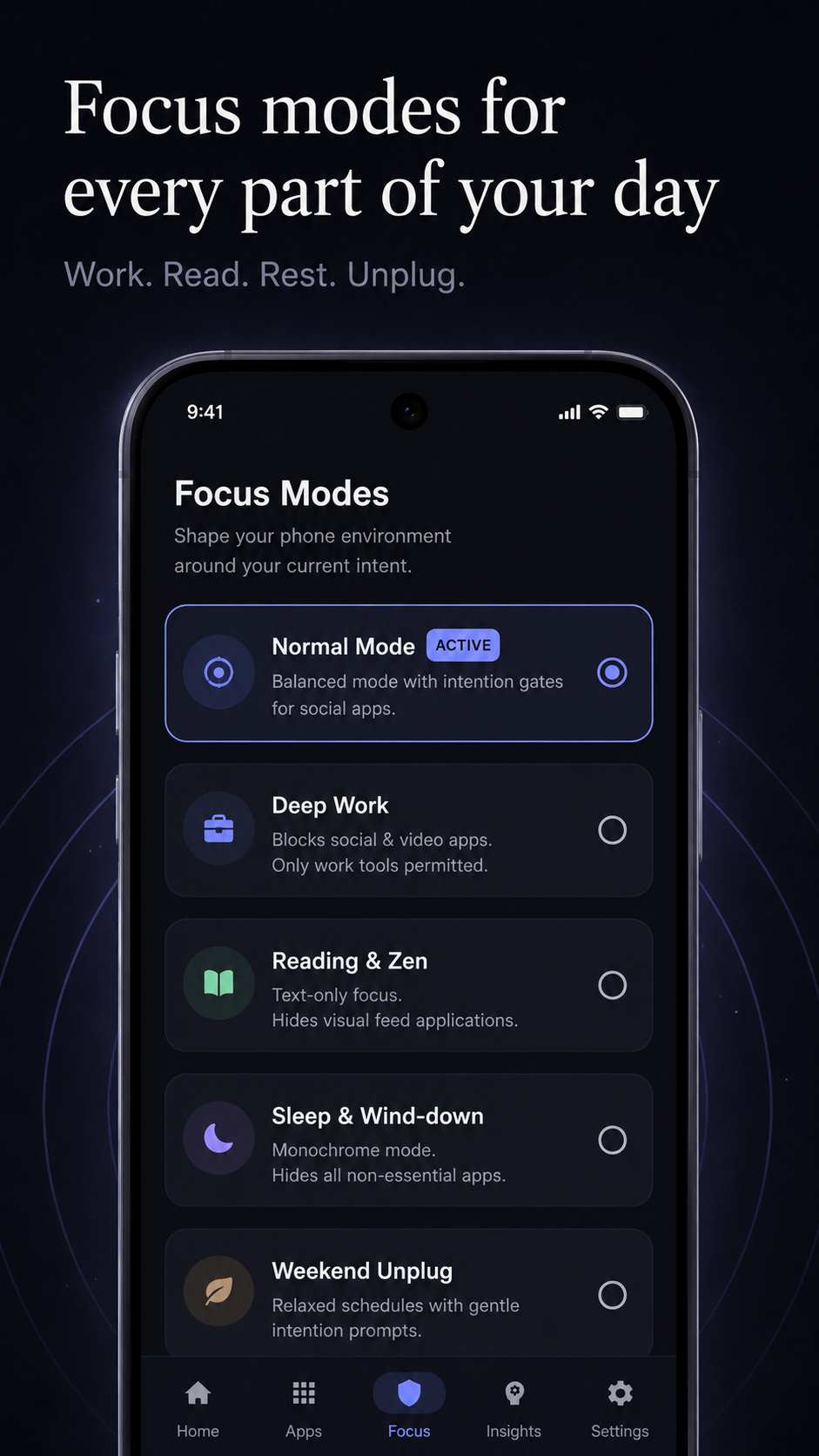
Focus modes for every part of your day.
Deep Work, Reading and Zen, Sleep and Wind-down, Weekend Unplug. Set time-based schedules that switch modes automatically.
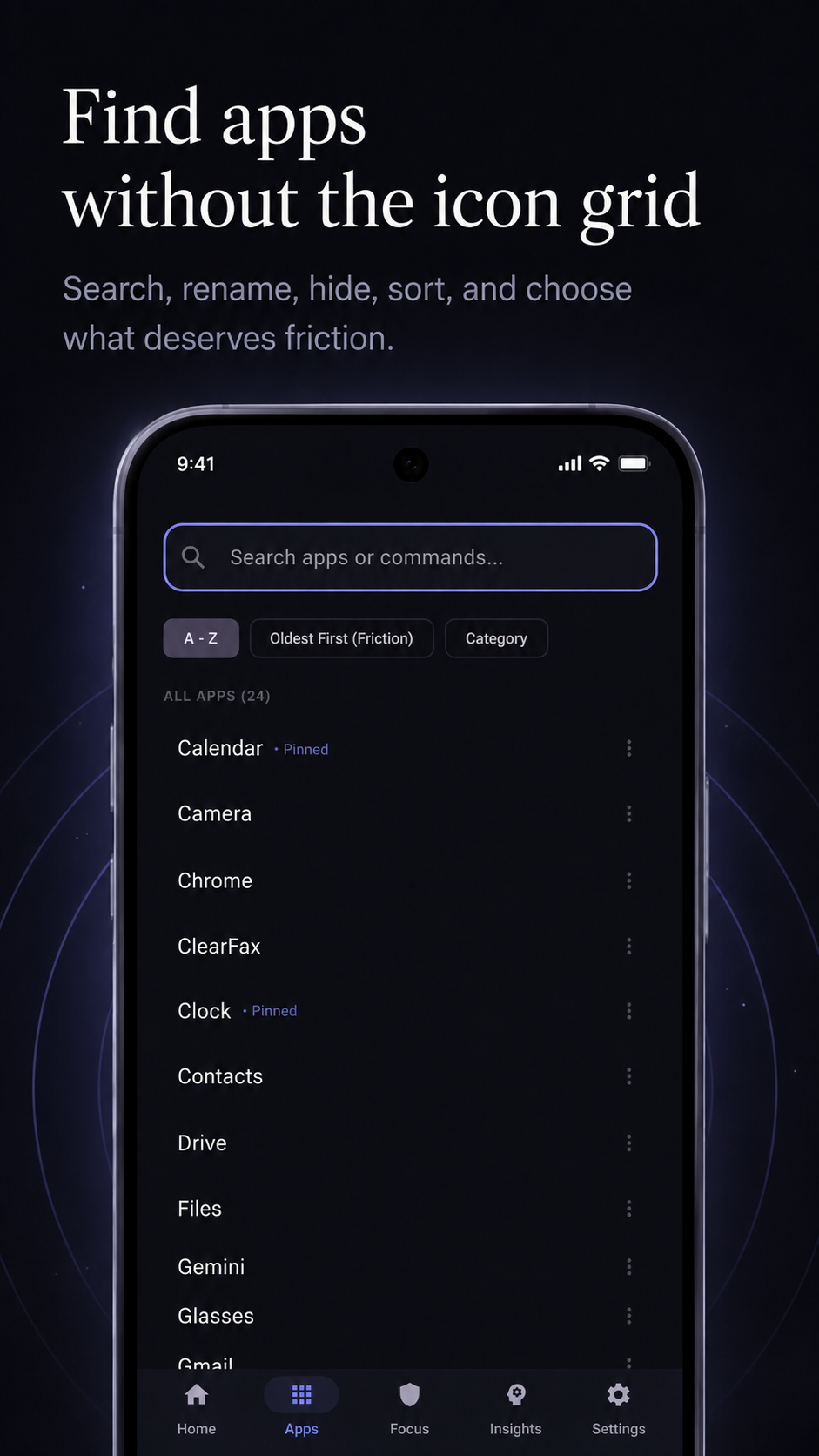
Find apps without the icon grid.
Search, sort alphabetically, by category, or oldest-used-first. Rename apps with custom aliases, pin essentials, or hide them entirely.
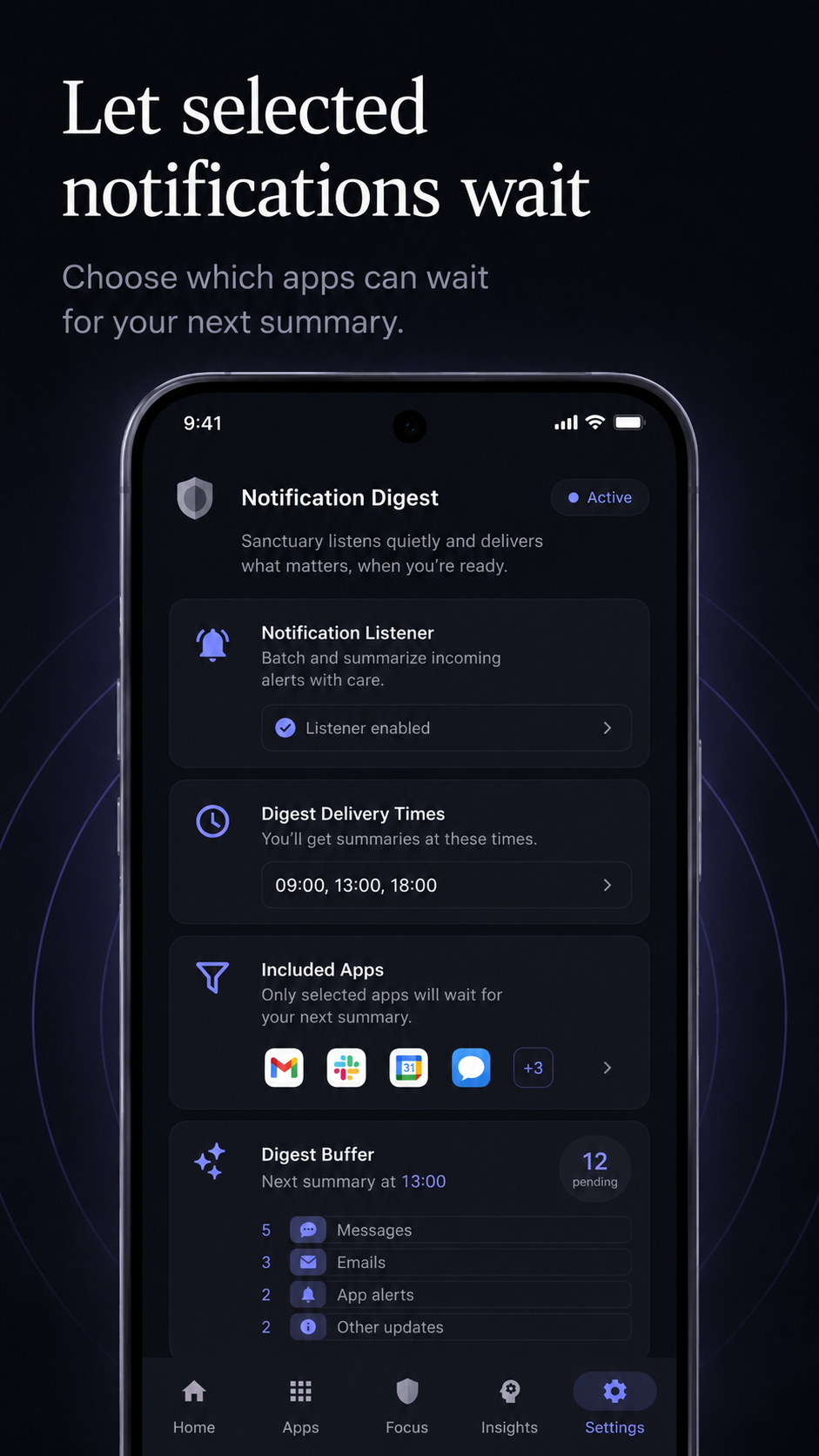
Let selected notifications wait.
Choose apps whose non-urgent notifications wait for a scheduled digest. Titles and previews are stored only on your device.
Android delivers notifications before a listener can dismiss them, so some devices may briefly show an alert before Sanctuary removes it.
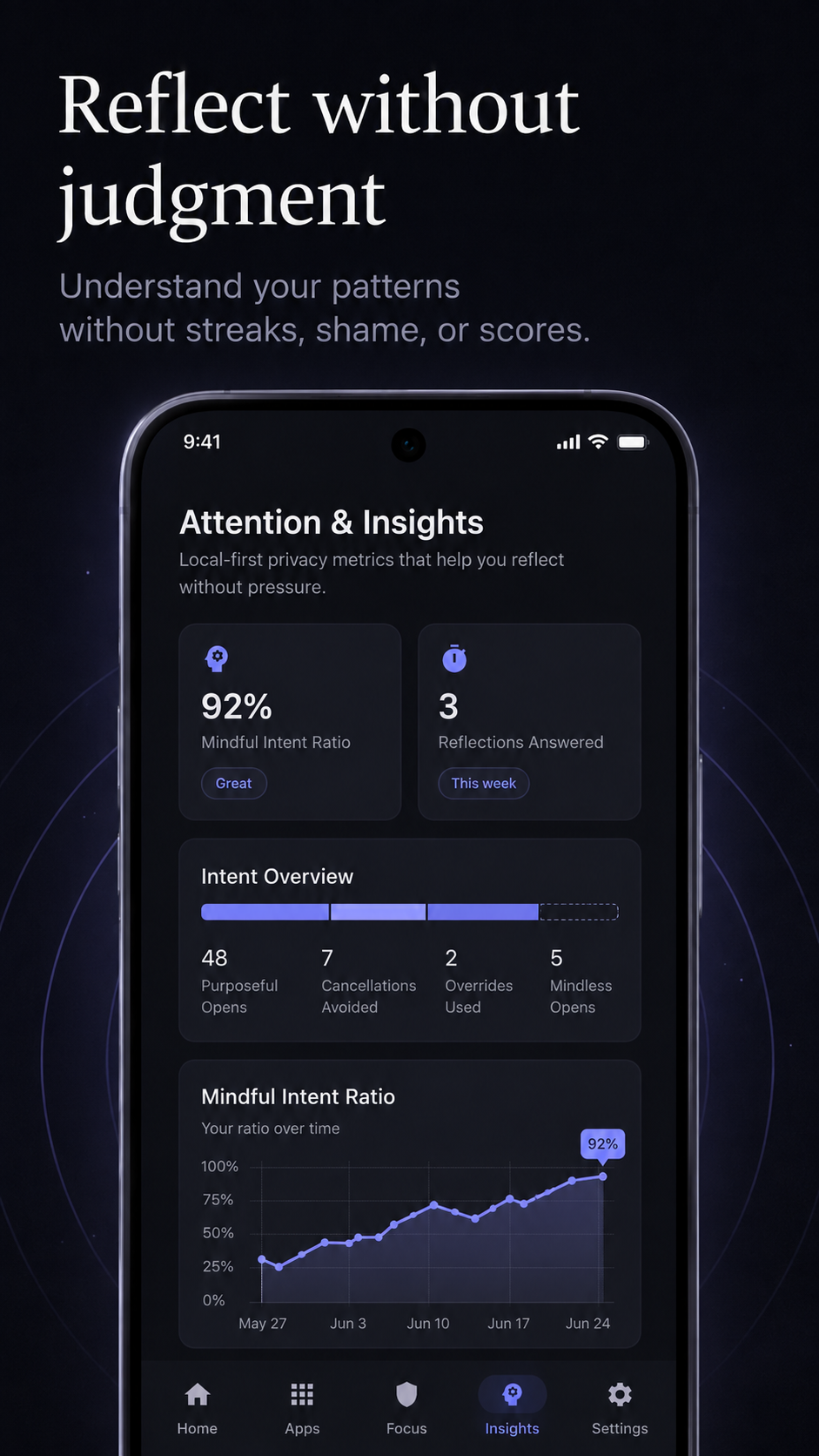
Reflect without judgment.
No streaks, no trophies, no shame. Review purposeful openings, times you decided not to continue, overrides, per-app patterns, and Sanctuary Insights.
Different pulls. Same four seconds.
Compulsive phone use is not one problem. Sanctuary gives you the same small set of tools, arranged differently depending on what keeps pulling you back.
If you are trying to stop doomscrolling
Put Instagram, TikTok, X, Reddit, and YouTube behind Intention Gates and give each a daily budget. The four-second pause is usually longer than an unmotivated impulse survives.
If you have ADHD or find task-switching costly
The text-first home screen removes the visual bait that hijacks a glance at the clock. Deep Work mode hides everything that is not the task, and the gate interrupts the switch before it becomes a detour.
If you do focused knowledge work
Schedule Deep Work to start with your calendar. Non-urgent notifications collect into a digest delivered at times you choose, so your phone stops setting the agenda for your morning.
If you are trying to sleep better
Sleep and Wind-down switches on automatically at a time you set, hides non-essential apps, and turns the home screen monochrome. The last scroll of the night has to be a decision.
If you are a student
Set a study block, hide social apps for its duration, and let the reflection view show you where the hours actually went — without streaks or a score to game.
If you are a parent setting an example
Sanctuary is for your own phone, not for surveilling someone else's. There is no parental dashboard and no remote monitoring, because there is no cloud to monitor from.
How Sanctuary compares to the usual advice.
Most approaches to screen time either do too little to change behavior or so much that you turn them off within a week.
Grayscale mode
LimitationMakes the screen less appealing but does nothing at the moment you open the app.
With SanctuaryMonochrome is available inside focus modes, layered on top of an actual pause.
Built-in Digital Wellbeing timers
LimitationReports the damage after the fact and is dismissed with a single tap.
With SanctuaryIntervenes before the app opens and asks for a stated reason, then records whether you continued.
Hard app blockers
LimitationEffective until they aren't, then you uninstall them in frustration and rebound.
With SanctuaryFriction rather than prohibition. You can always proceed, so there is nothing to rebel against.
Switching to a dumb phone
LimitationCosts you maps, payments, transit, and camera along with the distractions.
With SanctuaryKeeps the useful phone and removes only the automaticity.
Screen time apps with accounts and dashboards
LimitationSolve a privacy problem by creating a bigger one — your attention data on someone else's server.
With SanctuaryNo account, no analytics, no cloud. Everything is computed and stored on the device.
Your attention belongs to you.
Why does Sanctuary use Accessibility?
Android apps can be opened through notifications, links, widgets, Recents, and other system surfaces. With your permission, Sanctuary uses Android Accessibility to detect when an app you selected enters the foreground so it can display an Intention Gate or daily-limit screen. Sanctuary does not retrieve screen content or read passwords, messages, form fields, or keystrokes.
Simple, honest pricing.
No dark patterns. No fake scarcity.
Sanctuary
Free
The quiet home screen and essential tools for more intentional phone use.
Get Free VersionSanctuary Pro
$3.99/mo or $29.99/yr
Advanced limits, modes, schedules, and Reflection Without Judgment tools.
Start Free Trial in AppNo account required. Subscription managed securely through Google Play.
Straight answers.
The questions people actually ask before installing a minimalist launcher.
- What is an Intention Gate?
- An Intention Gate is a short, deliberate pause that Sanctuary Launcher places between you and a distracting app. When you open an app you have selected, Sanctuary shows a breathing timer of a few seconds and asks "What are you opening this for?" You choose a reason — a specific purpose, just checking, a habit, or a timed session — and Sanctuary then opens the app normally. Nothing is blocked. The gate simply converts an automatic tap into a conscious decision.
- What is the best minimalist launcher for Android?
- The right minimalist launcher depends on what is pulling you in. If your problem is a visually noisy home screen, a plain text launcher is enough. If your problem is compulsive opening — reaching for Instagram, TikTok, Reddit, X, or YouTube without deciding to — you need friction at the moment of the open, not just a quieter wallpaper. Sanctuary Launcher combines a text-first home screen with Intention Gates, daily app limits, and scheduled focus modes, and processes everything on the device with no account and no analytics.
- How do I stop doomscrolling on my phone?
- Willpower fails against interfaces engineered for automaticity, so change the interface instead. Three changes do most of the work: remove distracting apps from your home screen so opening them requires a deliberate search; add a pause before the app launches so the impulse has to survive a few seconds; and set a daily time budget so a long session ends on a decision you made earlier. Sanctuary Launcher implements all three — a boring home screen, Intention Gates, and daily app limits.
- Does Sanctuary block apps completely?
- No. Sanctuary is built on friction rather than prohibition. Intention Gates ask you to pause and state a purpose, but you can always continue. If you want something firmer, daily app limits show a calm wall when your budget is spent, and focus modes such as Deep Work or Sleep and Wind-down can hide non-essential apps entirely for a scheduled block of time. You are never locked out of your own phone.
- Is Sanctuary Launcher free?
- Yes. The free version of Sanctuary includes the text-first home screen with up to nine essential apps, the app library, and the core tools for more intentional phone use. Sanctuary Pro adds advanced daily limits, the full set of focus modes and automatic schedules, the notification digest, and the deeper reflection and insight views. Pro costs $3.99 per month or $29.99 per year, billed through Google Play. There is no account to create.
- Does Sanctuary collect my data?
- No. Sanctuary has no user account, no advertising SDKs, no behavioral analytics, and no developer-operated cloud. Your intentions, app usage patterns, limits, and insights are computed and stored on your device only. Nothing about your attention is transmitted or sold. Because there is no cloud copy, uninstalling the app deletes your history — export a local backup first if you want to keep it.
- Why does Sanctuary need the Accessibility permission?
- Android lets an app be opened from many places: a notification, a web link, a widget, or the Recents switcher. Sanctuary can only see its own home screen, so without the Accessibility Service it cannot tell that Instagram just came to the foreground from a push notification. With your permission, the Accessibility Service tells Sanctuary that a specific app you selected has entered the foreground, so it can show the Intention Gate or the daily-limit screen. Sanctuary does not read screen content, keystrokes, messages, form fields, or passwords, and sends no accessibility data off the device. The permission is optional.
- Does a minimalist launcher actually reduce screen time?
- It helps most with unconscious use, which is where a large share of screen time comes from. Removing app icons from the home screen breaks the muscle memory of tapping a familiar spot, and a few seconds of enforced pause is often enough for an unmotivated impulse to dissolve. It will not reduce time you genuinely intend to spend. Sanctuary is designed around that distinction: it reports purposeful opens and moments you chose not to continue, rather than pushing your total minutes down as a score.
Sanctuary Launcher at a glance
- Platform
- Android, distributed through Google Play
- Developer
- Galadriel Labs
- Price
- Free; Pro $3.99/month or $29.99/year
- Account required
- None
- Data collection
- None — all processing is on-device
- Home screen
- Text-first, up to nine essential apps
- Focus modes
- Normal, Deep Work, Reading and Zen, Sleep and Wind-down, Weekend Unplug
- Permissions
- Accessibility and Notification Access, both optional
A phone that feels like a tool again.
Sanctuary does not ask you to abandon useful technology. It helps make distracting behavior less automatic. Use your phone when you mean to. Leave when you are done.
Get Sanctuary for Android